
SolidRocks V2 for 3DSMAX Main Interface
For ultimate ease of use, SoliRocks comes with modular GUI and useful tools and settings to stay concentrated on creation instead of loosing time on tedious technical settings. The GUI can be collapsed at any moment into a mini/essential GUI.
Compact Interface
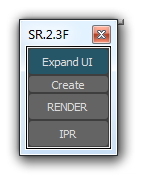
SolidRocks interface (GUI) can be compacted at any moment (using the "compact UI" button). This give user more room for work, while maintaining access to essential tools (IPR, render, create V-Ray objects).
New Vertical command panel
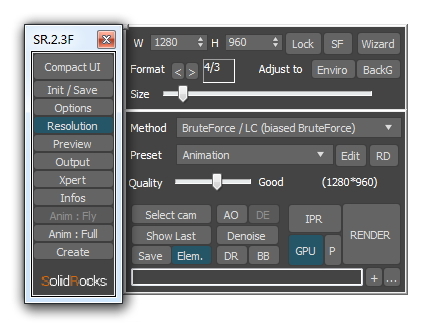
This vertical strip allows to open/close needed Panels.
Right click on it to save/use your preferred combinations.
Render Size panel
All important resolution parameters are under your mouse pointer.
SR gives quick access to standard Formats, Safe Frame (SF) on/off, Print Wizard assistant...
Render Quality rollout (The main Panel)
- Try different GI methods easily with the new GI Method selector.
- Just choose the desired quality and press the Render button.
- IPR quick access. Works for Both Adv and GPU engines (Vray NEXT)
- Denoise button : activates the denoise render element (Vray 3.4+)
- AO (Ambient occlusion) and DE (Detail Enhance) are now accessible for best convenience.
- NEW: "P" button for Vray 3.0 Progressive AA option.
- NEW: GPU/ADV button for engine switch
- Choose required preset, or make your own!
- Quick access to last rendered image (Show Last).
- Quick access to Render dialog panel (RD).
- Override Max region options with Region button.
- NEW: Unified Save feature. Select final path/filename right into SolidRocks, and use "Save" and "Elements", whatever you're using max or V-Ray frame buffer, SolidRocks will manage the saving.
- Quick access to Distributed Rendering (DR) and BackBurner (BB) rendering.
Preview panel
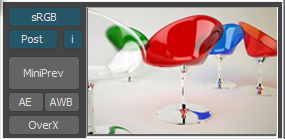
A mini preview render is integrated in SolidRocks.
It helps user to achieve a complete gamma correction (consistent gamma into viewports, material editor and rendering). Now Linear workflow is simple as a click.
- gamma sRGB or User mode
- Post button for gamma baking in postprod
- Show overexposed pixels (OverX) to assist exposure settings
- Auto Exposure tool to adjust camera shutter speed
- Auto White Balance tool to adjust camera's custom colour balance
Color mapping panel
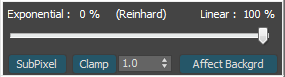
Thanks to this rollout you gain fast access to essential colour mapping options.
Use the slider to setup your preferred exponential/linear ratio.
Of course these settings (and all others) are saved and restored with each scene.
Xpert panel for power users
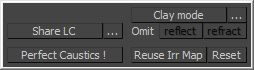
This panel extends solidrocks interface to give you more tools; like Shared light cache tool, Clay tool, and the new "Perfect direct Caustics" tool.
Infos Panel
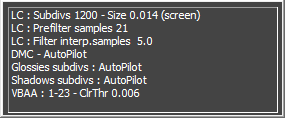
This panel shows in real time the essential V-Ray settings changing when the user changes the resolution and / or adjusts the desired quality.This view provides a global overview of Vray settings, and helps new V-Ray users to learn the most important settings in V-Ray to deal with quality and render times. Vray power users will find here the opportonity to give an eye on essential values before hitting "Render" button.


