
Smart Preset editor for V-Ray power users and VRayMasters
SolidRocks comes with a complete and customisable preset system.
Users can modify factory presets, create their own presets, and even share them on SolidRocks forum !
The preset editor is divided into 4 sections :
The main preset panel
In this panel the user defines their desired values in a unique and simplified manner:
computed values
Simply tell the editor your desired values for medium and production settings.
SolidRocks will then interpolate all the others values (low, good, very good).
Automatic interdependent values
SolidRocks will carry out the computations for your desired settings.
For example, as you probaly know, in V-ray the irradiance map Hsph value is tied to the Global mutliplier value of the DMC sampler.
So if you enter 40 hsph and have the global multiplier set at 2.0, then the real subdivs value will be 80 !
SolidRocks provides help, requesting directly your desired final hsph value. So if you enter 40 here, the final subdivs will be 40 for real, as SolidRocks will compute the correct value, depending on the Global multiplier.
Same thing for Detail Enhance subdivs:
The value for managing Detail Enhance quality is a multiplier dependent on hsph and Global multiplier values, and is hard to understand and manage.
SolidRocks asks you for your desired final subdivs for the Detail Enhance feature and will set the correct value to get your desired subdivs. Simple as that !
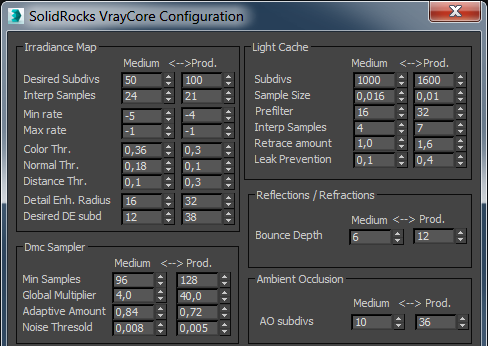
Image Samplers Panel
The values in this panel will assist the user to manage massive changes into lights and materials if required.
Adaptive Anti-Aliasing (Classic)
In this panel you'll explain to Solidrocks your favorite AA settings for medium and production settings. SolidRocks will compute all intermediate settings by itself (low, good, very good...)
note that the max values are low as this Sampler is focused to manage Antialiasing, and nothing else.
All the glossies will be managed by the DMC sampler.
VBAA - Variance Based AA
this New sampler introduced with Vray 3.3 have a brand new behavior and settings.
If you're using Vray 3.3 new sampler (see SR options panel), Then SolidRocks will apply these values instead of classic AA ones.
As the new sampler computes almost all parts of the image (AA and blurry) the max value are quite higher then the regular AA (Older Vray versions).
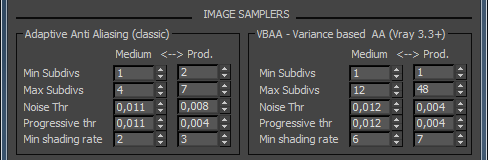
Global Values panel
The values in this panel will assist the user to manage massive changes into lights and materials if required.
Materials and lights section
The parameters in this section are applied at render time only if you've activated "Auto Vray Shadows subdivs" and/or "Auto Glossies Subdivs" on the SolidRocks configuration panel.
These values will be forced at render time for all V-Ray lights, IES lights and V-Ray shadows, and/or materials reflection/refraction subdivs.
Of course they will be multiplied by the Global multiplier at render time.
For example if you've applied this feature, in this example the real materials glossies subdivs will be 8*2 = 16 at medium and 8*8 = 64 at production level.
Note : These parameters are affected ONLY at render time and don't change any of your materials/lights settings until you apply them via the "apply mats" and "apply lights" buttons located in the "init/save" rollout in SolidRocks.

Resolution dependant values panel
As you probably know, some Vray parameters HAVE to be changed when the resolution of the final image is changed.
That's why the first panel (GI settings) asks the user to enter quality values for a 640*480 pixels image (all vray default settings are provided for this standard resolution)
For example, when the resolutions grows, Light cache subdivs need to be increased, some Irradiance map values can be lowered, and antialising can be lowered, too (each time you double the image size, you manually create an additionnal subdiv !). The Detail Enhance radius is also resolution dependent.
This panel gives user the ability to tell V-Ray how dependent settings have to be modified when image size is doubled.
This is done by allowing the user to define factors to be applied to the desired values each time the image size is doubled.
With SolidRocks, V-Ray behaviour can be deeply managed and automated to suit your own requirements !



